Network Whitelisting
Network whitelisting is a security measure that restricts access to specific IP addresses, ensuring that only trusted sources can communicate with your systems. This is crucial for protecting your infrastructure from unauthorized access and potential cyber threats. By whitelisting IP addresses, you can create a controlled and secure environment for data exchange between your application and our product.
External Application to SuperProcure
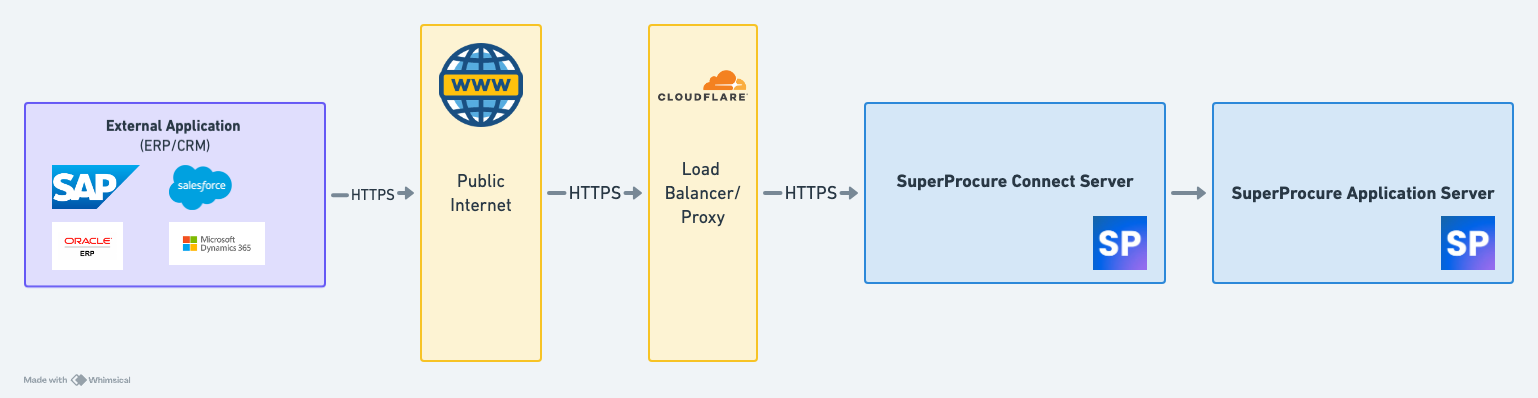
Please find the Public IP and hostname of SuperProcure Server which should be whitelisted for connection from client application server to SuperProcure server as below
We have a network level proxy on the hostname which will receive the request and then route it to our servers. The proxy IP address is not static. We would the client team to whitelist the hostname and the list of below mentioned IPs as per the Environment mentioned below.
Please find the list of IP & IP range to be whitelisted as below:
QA Environment Public IPs of SuperProcure:
20.198.18.50
QA Environment Domain Name
https://erpuat2.superprocure.com
Production Environment Public IPs of SuperProcure:
15.207.194.80
4.224.160.180
Production Environment Domain Name
https://connectv2.superprocure.com
Connectivity Test:
To ensure the connectivity is established you integration or network team should perform a telnet test post the whitelisting activity is performed in the network level using the below command from the server from which the connection to the SuperProcure server will be established for REST API Integration
Telnet Command Format :
telnet <Domain Name/IP Address> <Port Number>
UAT :
telnet 20.198.18.50 443
Production :
telnet 15.207.194.80 443
Note : Please ensure that telnet is enabled in the server from which the connection test will be performed The command will return a successful connection response
SuperProcure to External Application
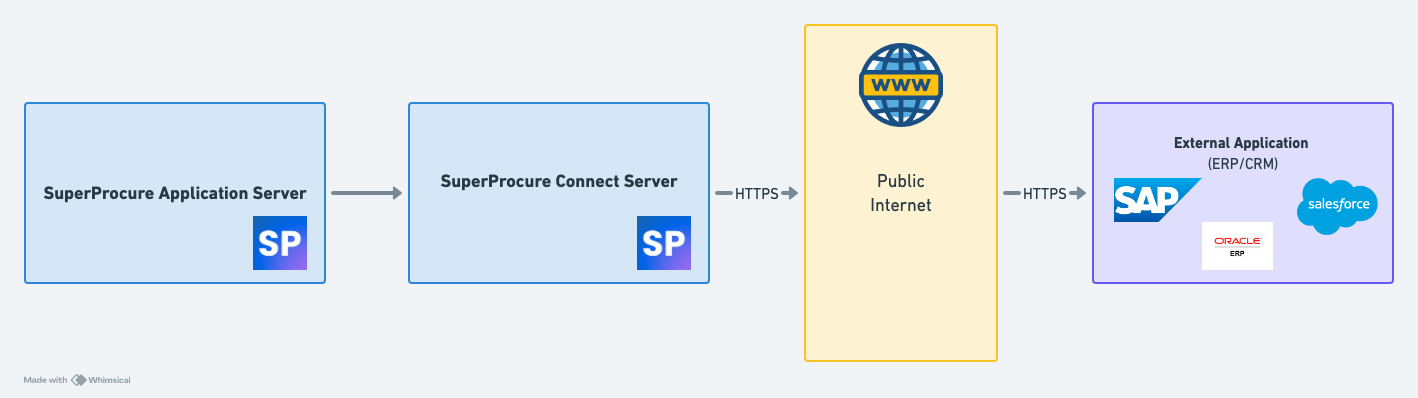
- Please fill your servers Domain Name/IP name for QA and Production server so that we can have it whitelisted in our network setting
Whitelisting Request Form
Please find the list of IP from which the connection from SuperProcure will be established to the external system as below:
QA Environment Public IPs of SuperProcure:
20.198.18.50
Production Environment Public IPs of SuperProcure:
15.207.194.80
Connectivity Test
Telnet Command Format :
telnet <Domain Name/IP Address> <Port Number>
UAT :
telnet <Customer QA Domain Name/IP Address> <Port Number>
Production :
telnet <Customer Production Domain Name/IP Address> <Port Number>
Recommedations
- For the REST API Integration it is recommended to use HTTPS over HTTP.
- The domain certificate is valid for one year and the certificate change of SuperProcure will be communicated at least 14 days in advance with the renewed certificate chain. Please link the latest SSL certificate in the following link
Support
In case of any clarifications regarding the network whitelisting activity please contact the below
| Name | Escalation Matrix | |
|---|---|---|
| Customer Support Team | Level 1 | support@superprocure.com |
| Integration Support Team | Level 2 | integration@superprocure.com |
| Delivery Head Integration | Level 3 | deliveryhead.integration@superprocure.com |
| Escalations | Level 4 | escalations@superprocure.com |